Salvo Sums: a maths-powered sea battle in SwiftUI
Salvo Sums is a Battleships-style game for iPhone and iPad with one twist: you can’t fire until you’ve earned your ammo, and the only way to load your guns is to answer a GCSE maths question correctly. Get it right and you fire. Get it wrong and you lose your turn, but you see a short worked explanation of where it went wrong.
It started as a question about what a learning game should look like in Xcode, and grew into a full app over an afternoon. The constraints were deliberate:
- Learning first. The game is the reward; the maths is the point. Every wrong answer has to teach something.
- Offline, no backend. No accounts, no server, no analytics. Everything runs on the device.
- Testable. The game logic has to be testable without a simulator, and the whole game has to be playable by an automated test.
Architecture: a game engine package and a thin app
The most important decision came first: all the game logic lives in a local Swift package, BattleEngine, that doesn’t import SwiftUI or UIKit. The board, the ammo rules, the question generators and the computer opponent are plain value types. The app target is a thin SwiftUI layer on top.
This pays off in three ways:
- Tests run in seconds. Engine tests don’t need a simulator or a running app. You can run them from Terminal with
swift test. - The rules can’t depend on the UI. There’s no way for a view to sneak game logic in, because the engine can’t see the views.
- The UI could change completely (a new design, a watchOS version, a web port) without touching the rules.
The app side has one view model, GameViewModel, marked @Observable and @MainActor. Views call methods like fire(at:) and answer(_:), and SwiftUI redraws whatever reads the properties that changed. Sounds and haptics hang off a lastShot event rather than being called from the game logic, so the view model never needs to know about audio.
The turn loop
A game moves through a small set of phases: placing your fleet, your turn, the enemy’s turn, and won or lost. Your turn has two halves. With no ammo you answer a question. With ammo you fire until it runs out.
The phase is a plain enum, and every action checks it before doing anything:
enum Phase: Equatable {
    case placing, playerTurn, enemyTurn, won, lost
}

var canFire: Bool { phase == .playerTurn && ledger.ammo > 0 && armedWeapon == nil }
var canAsk: Bool { phase == .playerTurn && ledger.ammo == 0 && question == nil && armedWeapon == nil }
The enemy’s turn runs after a short pause so you can see what happened, using a Task and Task.sleep. That pause caused a real bug: if you started a new game while the enemy was “thinking”, its shot still landed, but in the new game. The fix is a game ID that bumps on every new game, captured when the turn is scheduled and checked when it runs:
private func startEnemyTurn() {
    phase = .enemyTurn
    let scheduledFor = gameID
    Task {
        try? await Task.sleep(for: .milliseconds(900))
        enemyTakesTurn(in: scheduledFor)
    }
}

private func enemyTakesTurn(in game: Int) {
    guard game == gameID, phase == .enemyTurn else { return }
    // ...
}
It’s the same idea as a cancellation token, without having to keep hold of the Task.
Earning ammo
The reward rules live in AmmoLedger, a small struct with no dependencies:
public mutating func recordAnswer(correct: Bool, tier: Tier) -> Int {
    guard correct else {
        streak = 0
        return 0
    }
    streak += 1
    var earned = tier == .higher ? 2 : 1
    if streak.isMultiple(of: 3) { earned += 1 }
    if streak.isMultiple(of: Self.streakForSpecial) { specialCharges += 1 }
    ammo += earned
    return earned
}
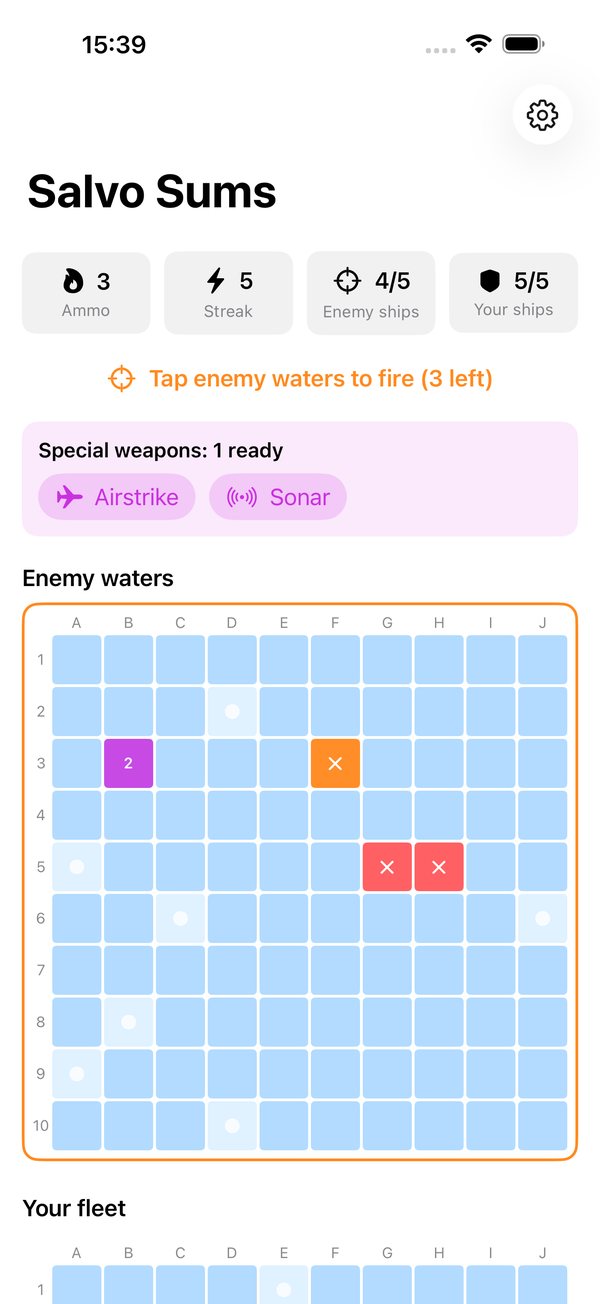
Foundation questions earn one shot and Higher questions earn two. Every third correct answer in a row adds a bonus shot, and every fifth unlocks a special weapon: an Airstrike that hits a plus shape of five squares, or Sonar, which counts the hidden ship sections in a 3 × 3 area without firing.
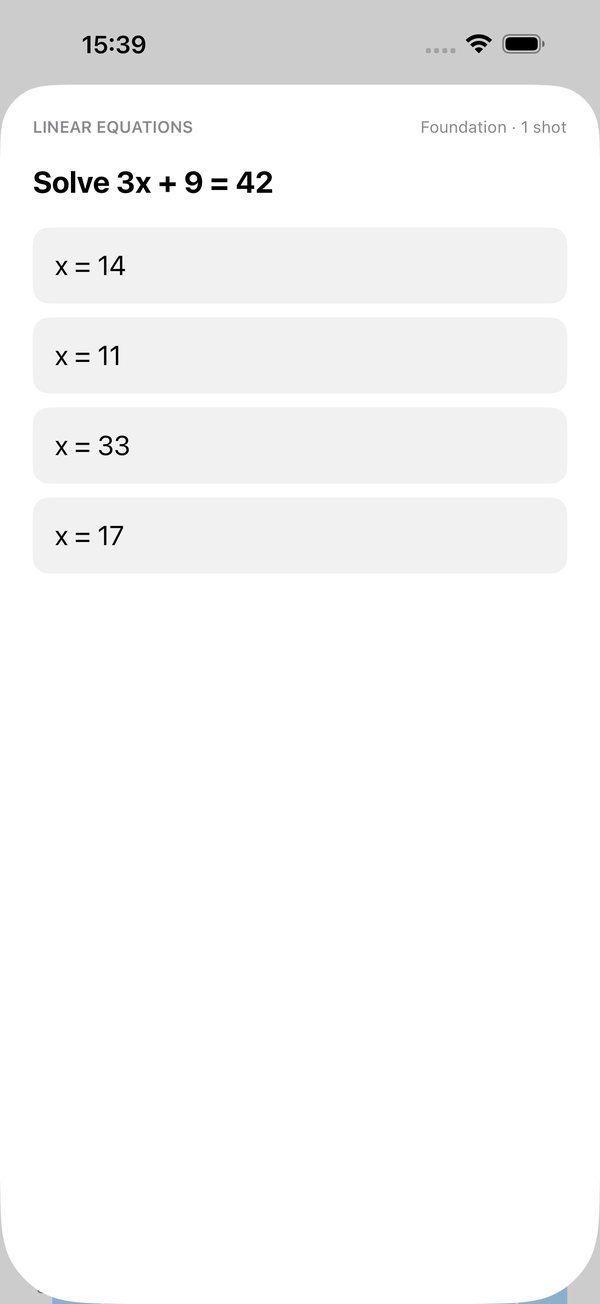
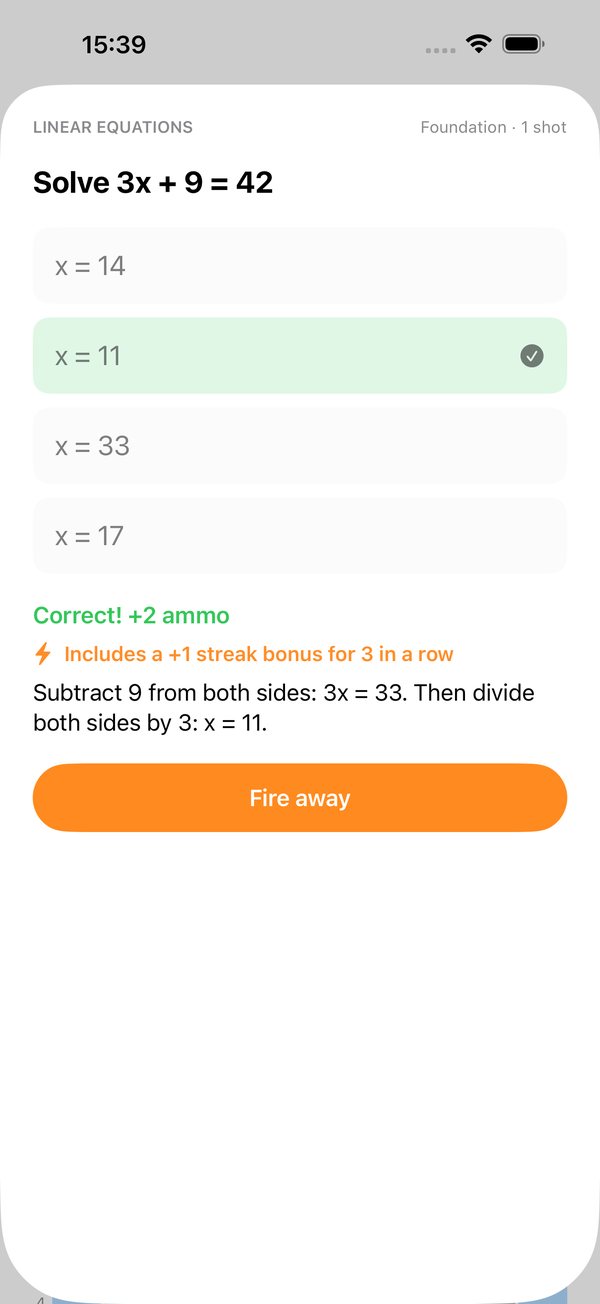
Because the rules are isolated, they’re also easy to test exhaustively. Testing also caught a confusing moment in the UI: a “Foundation · 1 shot” question that paid out two shots. The maths was right, because it was the third in a row, but the screen didn’t say so. The feedback now spells out the streak bonus.
Generating questions instead of storing them
The obvious approach is a bank of written questions. It’s quick to start, but it runs out, it repeats, and someone has to check every answer by hand. Salvo Sums generates every question instead. Each topic is a function that picks numbers, computes the answer, and builds the wrong options from the mistakes students really make.
The fractions generator shows the pattern:
static func fractions<G: RandomNumberGenerator>(_ rng: inout G) -> Question {
    let b = Int.random(in: 2...9, using: &rng)
    var d = Int.random(in: 2...9, using: &rng)
    while d == b { d = Int.random(in: 2...9, using: &rng) }
    let a = Int.random(in: 1..<b, using: &rng)
    let c = Int.random(in: 1..<d, using: &rng)
    let top = a * d + c * b
    let bottom = b * d
    let answer = Maths.fraction(top, bottom)

    return .build(
        topic: .fractions,
        prompt: "Work out \(a)/\(b) + \(c)/\(d)",
        answer: answer,
        candidates: [
            Maths.fraction(a + c, b + d),   // added tops and bottoms
            Maths.fraction(a + c, bottom),  // right bottom, forgot to scale the tops
            Maths.fraction(a * c, bottom),  // multiplied instead of adding
            // ...more fallbacks
        ],
        explanation: "Use a common denominator of \(bottom): ...",
        using: &rng
    )
}
Question.build takes the first three candidates that differ from the answer and from each other, shuffles them in with the answer, and records where the correct one landed. Each topic has its own list of mistakes:
| Topic | Example | Wrong answers come from |
|---|---|---|
| Fractions | 1/3 + 1/4 | Adding tops and bottoms, forgetting to scale the tops |
| Percentages | Increase £80 by 15% | Adding 15 instead of 15%, finding only the 15% |
| Ratio | Share £60 in the ratio 2:3 | Giving the smaller share, splitting in half |
| Linear equations | 3x + 9 = 42 | Forgetting to divide, a sign error |
| Area | Triangle, base 8, height 5 | Forgetting to halve, adding the sides |
| Probability | P(not red) | Giving P(red), using the wrong total |
| Expanding brackets | (x + 3)(x − 2) | Missing the middle term, a sign error |
| Pythagoras | Sides 6 and 8 | Adding the sides, forgetting the square root |
Checking every possible question
Generated questions have a risk that a fixed bank doesn’t: an unlucky combination of numbers could make two “different” wrong answers come out the same, leaving a question with only three options. Because the input ranges are small, it’s possible to check every combination rather than sampling some.
Running every possible input through the generators found three real gaps. A triangle with base 2 and height 2 has an area of 2, and three of its wrong answers all came out as 4. One bag of counters and one bracket expansion had the same problem. Adding one or two extra candidates fixed all three.
A code review found a subtler problem. One probability distractor divided red counters by non-red ones, and in about 1 bag in 11 that gave a “probability” bigger than 1. Any student who knows a probability can’t exceed 1 could rule it out without doing the question. It was replaced with a plausible wrong answer. Now a unit test sweeps 1,000 seeded questions per topic on every run:
@Test(arguments: Topic.allCases)
func everyQuestionHasFourDistinctOptionsAndOneCorrectAnswer(topic: Topic) {
    var rng = SeededGenerator(seed: 2026)
    for _ in 0..<1_000 {
        let question = QuestionBank.make(topic, using: &rng)
        #expect(question.options.count == 4)
        #expect(Set(question.options).count == 4)
        #expect(!question.options.contains("None of these"))
    }
}
An opponent that has to earn its shots
If the computer fired every turn while you had to answer questions, it would win almost every game. So the computer “answers” too: on each turn it rolls against an accuracy that depends on the difficulty, and only fires if it passes.
| Difficulty | Answers correctly | Targeting |
|---|---|---|
| Easy | 60% | Random squares it hasn’t tried |
| Medium | 75% | Hunt and target |
| Hard | 90% | Hunt and target |
Hunt and target is the classic Battleships strategy. While hunting, it only fires at squares where the row plus the column is even, a checkerboard. The smallest ship is two squares long, so every ship must cover at least one of those squares, and it finds them in half the shots. Once it has a hit, it switches to targeting the squares next to it. If two hits are already in a line, it prefers the squares that extend that line:
let wounded = Set(Coordinate.all.filter { board.state(at: $0) == .hit })
let targets = open.filter { cell in cell.neighbours.contains { wounded.contains($0) } }

if !targets.isEmpty {
    // Prefer cells that extend a line of two or more hits.
    let inLine = targets.filter { cell in
        cell.neighbours.contains { hit in
            wounded.contains(hit)
                && wounded.contains(Coordinate(column: 2 * hit.column - cell.column,
                                               row: 2 * hit.row - cell.row))
        }
    }
    return (inLine.isEmpty ? targets : inLine).randomElement(using: &rng)
}
The 2 * hit - cell trick reflects the candidate square through the hit next to it. If the square on the far side is also a hit, the candidate continues the line.
Notice that wounded only includes hits on ships that aren’t sunk yet. The strategy never looks at where your ships are, only at what a human player could see: hits, misses and announced sinkings. That keeps it honest, and it means the AI has no state of its own to get out of sync. It works out its next shot from the board every time. A test plays 200 seeded games with each strategy and checks that hunt and target needs fewer shots on average than random.
Seeded randomness
Everything random (fleet placement, questions, AI decisions) takes a generator as an inout parameter instead of calling the system’s random source directly. The app uses a tiny SplitMix64 generator:
public struct SeededGenerator: RandomNumberGenerator, Sendable {
    private var state: UInt64

    public init(seed: UInt64) { state = seed }

    public mutating func next() -> UInt64 {
        state &+= 0x9E37_79B9_7F4A_7C15
        var z = state
        z = (z ^ (z >> 30)) &* 0xBF58_476D_1CE4_E5B9
        z = (z ^ (z >> 27)) &* 0x94D0_49BB_1331_11EB
        return z ^ (z >> 31)
    }
}
The same seed always gives the same game, which makes tests repeatable and bugs reproducible. The original plan used GameplayKit’s seeded source, but a dozen lines of Swift removes the dependency and keeps the engine buildable anywhere Swift runs.
Testing
There are 25 engine tests, written with Swift Testing, and 5 UI tests, written with XCTest, that drive the real app in the simulator.
The engine tests cover placement, firing and sinking, the ammo and streak rules, special weapons, the AI and the question sweep. Two lessons came out of getting them running:
- Xcode hides a local package’s tests inside an app project. The package’s own scheme showed “No Tests”, so ⌘U was quietly running nothing but the UI tests. The fix was a separate test target in the Xcode project that compiles the package’s test folder, so the same tests run from both ⌘U and
swift test. #expectcan’t call mutating methods. Swift Testing’s macro captures the expression, so#expect(board.fire(at: c) == .hit)doesn’t compile. Store the result first, then check it.
The UI tests play the game for real. One places a fleet by hand, picks a ship up and puts it back vertically, then starts the battle. Another plays six full rounds: it answers a question, fires every shot it earned, waits for the enemy and checks that control comes back. Each grid square has an accessibility identifier (enemy-B4, player-J1), so the tests can tap exact squares. The same work makes the board usable with VoiceOver, which reads out “B4, Hit” rather than just “B4”.
Getting ready for the App Store
A few pieces of tooling made the release side much less manual:
- Screenshots are generated by a test. A launch argument (
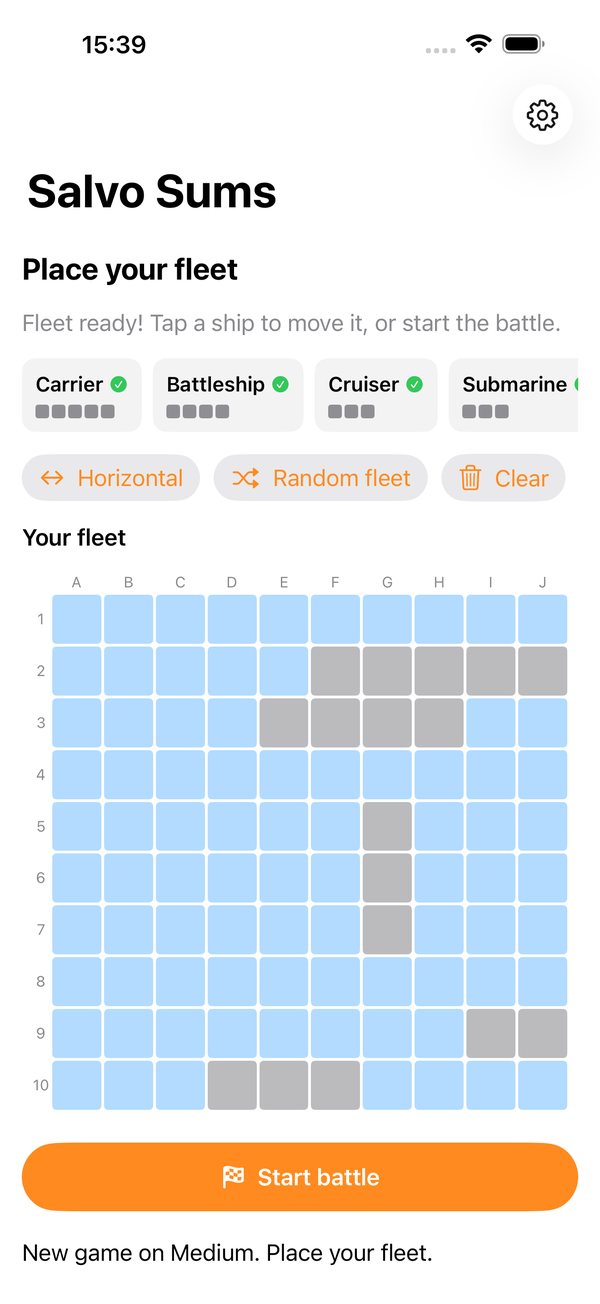
-screenshots battle, debug builds only) sets up a realistic mid-game position with a seeded game. A UI test then visits four screens and writes each PNG straight into the repo, finding the folder from its own source path with#filePath. Running it on the iPhone 16 Pro Max and iPad Pro 13-inch simulators gives exactly the 1320 × 2868 and 2064 × 2752 sizes App Store Connect asks for. Looking at the screenshots also caught two problems the tests had missed: ship names cut off on the placement screen, and a bonus shot the screen didn’t explain. - Privacy is declared, not just promised. The app collects nothing, and a privacy manifest says so. It declares the one “required reason” API the app uses,
UserDefaultsfor the sound setting, and the privacy policy lives on this site. - Sound effects are public domain. Eleven CC0 sounds from Kenney were trimmed and converted to AAC, about 130 KB in total. They play through an “ambient” audio session, so they respect the silent switch and don’t stop your music.
- The name avoids a trademark. “Battleship” is a Hasbro trademark, so the working title, BattleMaths, became Salvo Sums: a salvo is a burst of shots, which is exactly what correct answers earn.
What I’d change next
- Adaptive questions. Save how well the player does in each topic with SwiftData, and serve more questions from their weakest topics. That’s the biggest win for the learning side.
- Proper maths typesetting. Fractions are shown as
7/12text. Stacked fractions and superscripts would read much more like an exam paper. - Use the iPad’s space. On a 13-inch iPad the game only fills the top half of the screen. The boards should grow to fill it.
- A harder Hard mode. A probability-density AI, which scores every square by how many remaining ship positions could cover it, would make Hard feel properly ruthless.
- Rebalance the enemy. A streak can earn the player three shots in a turn, but the enemy only ever gets one. Hard mode could earn bonus shots too.
You can read more on the Salvo Sums page or browse the source on GitHub.